Assistive Technology

Welcome to the Assistive Technology section of our website. Here you will find information about software and hardware which can assist you in the use of a Computer, Smart Phone, Tablet, Smart Speaker and more.

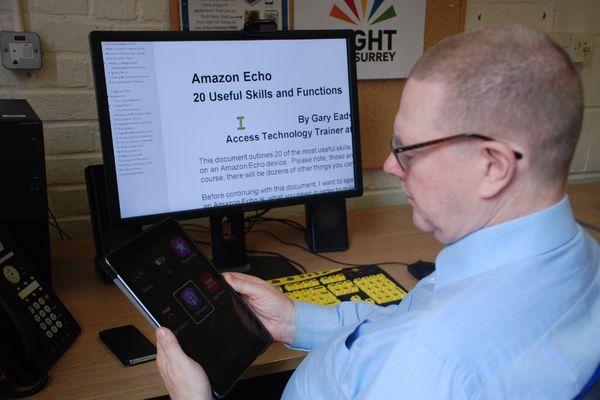
We employ an Assistive Technology Specialist, Gary Eady, who provides information, guidance, support and training in all aspects of ICT (Information and Communication Technology), in conjunction with specialist screen reading and/or screen magnification software. Gary has over 25 years’ experience of working with blind and vision impaired people and being blind himself, can fully understand the frustrations of trying to use technology with reduced vision.

Gary is able to support you with a wide range of specialist software and hardware solutions, including:

Screen Reading:

  • JAWS for Windows
  • SuperNova Screen Reader
  • NVDA (Non Visual Desktop Access)

Screen Magnification:

  • Windows Magnifier
  • SuperNova Magnifier with Speech
  • ZoomText with Speech
  • Dolphin Guide and Guide Connect

Smart Phones and Tablets:

  • Apple iPhone and iPad with VoiceOver (screen reader) and Siri
  • Android Smart Phone and Tablet with TalkBack (screen reader)
  • Specialist Apps for the Blind
  • Synapptic software
  • Blind Shell Classic Smart Phone

Smart Speakers:

  • Amazon Echo with Alexa
  • Google Home with Google Assistant

Employment Support:

Gary can also provide specialist support for those who are in employment and who may be struggling with their Assistive Technology. In addition, he can support by providing information on the government scheme Access To Work, which supports people with disabilities in the workplace.

ICT Volunteers:

Gary is also responsible for all ICT Volunteers who work for Sensory Services by Sight for Surrey. He provides each volunteer with a hands-on introduction to Assistive Technology, as well as providing handouts on the subject of specialist technology. Our ICT Volunteers can offer support in the setup of a computer, Smart Phone or Tablet and Smart Speakers such as Amazon Echo and Google Home. In addition, our ICT Volunteers can support in the areas of diagnosing and fixing problems with printers, broadband rooters and email accounts.

For further information, please email technology@sightforsurrey.org.uk or by telephone on 01372 377701.

Let’s Talk Tech

‘Let’s Talk Tech’ is a webinar via the Zoom online meetings platform. Sessions are delivered by Gary Eady, Access Technology Trainer and Keith Dear, AI Trialblazer from Sensory Services by Sight for Surrey.

Sessions run bi-monthly on Wednesdays from 11:00am to 12:30pm covering a variety of technology topics. Occasionally the webinar maybe be scheduled on a Monday from 2.00pm – 3.00pm.

A list of confirmed webinars for 2026 are below:

Wednesday 28th January, Smart Glasses – how they can help you?

In this session we will demonstrate and discuss the Meta Ray-Ban Smart Glasses and how they can be used for:

  • Reading text from documents
  • Identifying the scene infront of you
  • Recognising objects
  • Alternatives to these glasses

Wednesday 25th March, an introduction to Windows and Screen Readers

In this session we will demonstrate and discuss the range of screen reading applications which can be used in the Windows11 operating system. These will include:

  • Jaws
  • NVDA
  • Super Nova
  • Narrator
  • And how AI screen reader can be used to read text from the screen such as documents, email messages and web pages.

Wednesday 27th May – AI apps, what are they and how can they help you?

In this session we will demonstrate and discuss a range of Artificial Intelligence (AI) apps. These will include:

  • Chat GTP
  • Seeing AI
  • Be My Eyes and PI (Personal Intelligence)
  • Safety and the pros and cons of using AI

Wednesday 29 July – Synapptic, the app that makes an Android device easy to use

  • How the app presents features in large print with a high contrast  colour scheme
  • How the app speaks out the menus and other screens as you navigate 
  • Why it’s the ideal app for a person who is either new to using a Smartphone or can no longer use their device due to sight loss

Wednesday 30th September – Using a Screen Reader on your Smartphone or Tablet 

In this session we will discuss and demonstrate:

  • Using a Smartphone or Tablet in conjunction with the built-in screen reader (VoiceOver on Apple devices or TalkBack on Android devices)
  • How the screen reader can be used to read icons on the screen, read text and email messages as well as text on web pages
  • Explain what gestures are and how they are used to control the screen reader

Wednesday 25th November – Windows 11 Accessibility Features

In this session we will discuss and demonstrate:

  • The range of features built-in to Windows 11 designed to help people who are blind or partially sighted, These include the magnifier, high contrast colour schemes, large mouse pointers, using dictation and the built -in screen reader called Narrator.

To book a place on any of the above sessions please contact us via email technology@sightforsurrey.org.uk or call our Helpdesk on 01372 377701 stating which sessions you are interested in. Please check your registered email for changes and updates.